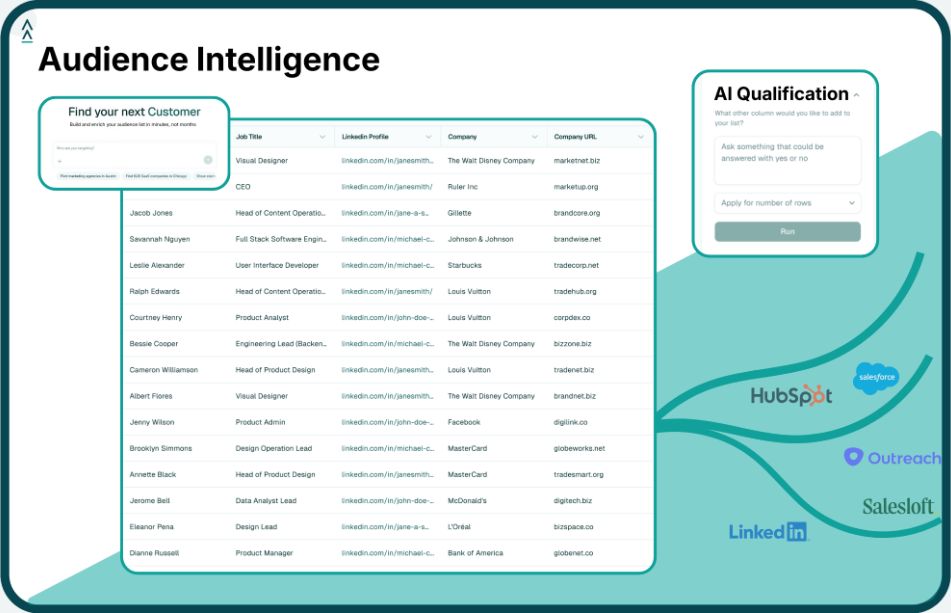
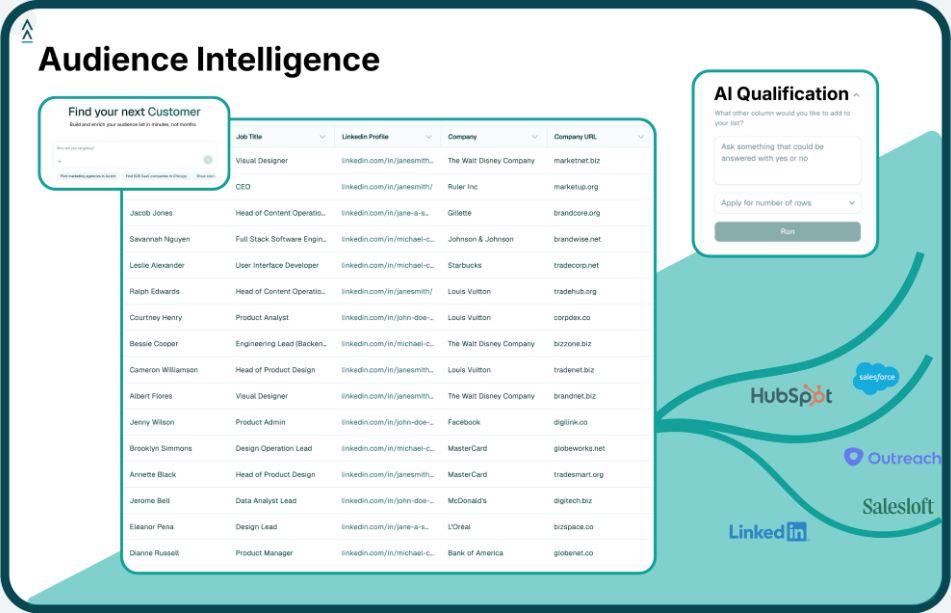
Step 1: Define the Task for Your AI Agents (ICP, List Size, Qualification Criteria)
The first step in orchestrating AI agents is to clearly define the task you want them to accomplish. In GTM terms, this means pinning down your Ideal Customer Profile (ICP), the scope of the list or data you need, and the qualification criteria for a “good” lead. Essentially, you’re answering: What outcome do I want from this multi-agent workflow? The more specific you are, the better your AI agents can deliver.
- Identify Your ICP: Start by describing the ideal customer or prospect you want to target. Are you looking for “SaaS startups in Europe hiring for RevOps roles” or “Healthcare enterprises in North America evaluating zero-trust security solutions”? The ICP should include firmographics (industry, company size, location), and any key attributes (tech stack, hiring trends, funding stage, etc.). A well-defined ICP is crucial – companies that tightly focus on high-fit prospects see much better conversion rates. In fact, a lack of focus is a big reason so many leads go nowhere. Studies confirm that 80% of new leads never translate into sales, largely because they weren’t properly qualified or nurtured(3). By zeroing in on your ICP, you help ensure your agents will spend time on the right prospects, not a random list of names.
- Determine the Output List: Next, decide what list or dataset your agents need to produce. Is it a list of target companies matching your ICP, or a list of contacts (with emails/phones) at those companies? How many do you need – a top 100 list, or up to 10,000 prospects for a big campaign? Being clear on the desired list size and depth helps configure your agents. For example, you might instruct one agent to gather 500 companies, then another to find 5 contacts per company, yielding up to 2,500 contacts. Also consider what fields or info each entry should have (name, title, industry, key signals, etc.). This becomes the blueprint for your AI workflow’s end product.
- Set Qualification Criteria: Just having a list isn’t enough – you want it to be high quality. Define what counts as a qualified lead for your purposes. This could involve firmographic filters (e.g. company revenue above $10M, based in specific regions), behavioral or intent signals (e.g. recently raised funding, actively hiring certain roles, content engagement), or a scoring model. Essentially, think about the signals that indicate a prospect is a good fit and possibly in-market. Write these down as rules or guidelines. For instance, “Include companies that use Cloud CRM software and have headcount growth > 20%” or “Flag contacts with C-suite or VP titles only.” These criteria will guide your agents in evaluating and filtering the raw list. It’s worth the effort – organizations that excel at lead qualification and nurturing generate 50% more sales-ready leads and do so at a 33% lower cost than those that don’t(3).
Taking the time to precisely define who you want to target and what a qualified result looks like sets the foundation for everything that follows. You’re effectively programming the mission in plain language. Remember, AI agents are literal: if your task definition is vague (e.g. “get some leads for us”), you’ll get scattershot results. But if you specify “Find 200 fintech companies in the US with Series B funding and identify VP or higher contacts in IT or security roles”, you’ve given a crystal-clear mission. In the next steps, we’ll assign agents to tackle each part of that mission.
Why this matters: A clear task definition prevents wasted effort. Without it, you might end up with a huge list of unvetted contacts – and sales teams already waste precious time on unqualified leads. One study found companies waste 71% of their internet leads due to slow or no follow-up(1), often because many leads weren’t truly ideal in the first place. By defining the ICP and qualifications upfront, your AI agents will surface prospects that your team can actually convert, instead of dumping a phonebook on their lap. Clarity here is the difference between an AI-driven workflow that generates revenue and one that generates noise.
Step 2: Assign AI Agent Roles in Your GTM Workflow
With your task defined, it’s time to break it into pieces and assign roles to AI agents for each part. Think of each agent as a specialist with a specific job, all collaborating to achieve the overall goal. In a manual team, you might have one person do research, another do data entry, another do outreach. Similarly, in an AI-driven workflow, you’ll have different agents each handle a portion of the work. By doing so, you leverage the strengths of each “AI specialist” and avoid overloading a single agent with an overly complex task.
What exactly is an AI agent role? It’s essentially a defined function or responsibility you give to an AI. For example, one agent might be responsible for searching the web or databases for companies, while another agent takes those companies and finds contacts, and yet another analyzes those contacts against your criteria. Dividing the labor this way has two big benefits: parallelization (agents can work semi-independently on their tasks) and optimization (each agent can use the best methods/tools for its specific job). This mirrors how high-performing sales organizations operate – they automate repetitive steps so humans can focus on what they do best. No wonder that companies who effectively automate parts of their sales process are much more likely to exceed their goals(2).
Here are some common AI agent roles you might assign for a GTM workflow:
- Market Research Agent (Prospector): This agent’s job is to find target accounts or companies based on your ICP. It might query databases, business directories, or even perform web searches to identify companies that match your filters (industry, size, location, etc.). Essentially, it builds the raw list of companies that feed into your pipeline. For instance, a Prospector agent could use an AI-powered search on LinkedIn or Crunchbase data to pull “all fintech startups in Europe with >50 employees”.
- Data Enrichment Agent (Signals Collector): Once you have a set of companies, you may need more data on them. A signals-focused agent can retrieve additional information about each company – think of things like recent news, tech stack (what software they use), funding rounds, hiring trends, or intent data. This agent enriches your list so you have context. For example, it could note that Company X just raised a Series A in January, uses AWS cloud, and is currently hiring for 5 sales roles. These data points (signals) will be useful for the qualification step and even for later personalized outreach.
- Contact Finding Agent (People Miner): This agent finds the actual contacts (people) at each target company that you likely want to reach. If your ICP is defined at the account level, you still need individuals – usually decision-makers or influencers – to talk to. The contact agent might use an AI that can scrape LinkedIn or a professional contact database to extract names, titles, and potentially emails/phone numbers of, say, all CISO or IT Security executives at those fintech companies the first agent found. It can also filter out lower-level titles if you only want senior contacts. The result is an enriched list of people at each account.
- Qualification Agent (Scoring/Filtering): This agent is the “analyst” that evaluates each company or contact against your qualification criteria. It uses the data gathered (from the enrichment agent and the contact details) to score or label which prospects are a strong fit. For instance, it could calculate a score 0–100 based on how many of your ideal signals are present, or simply tag each prospect as Qualified or Not Qualified by checking conditions (e.g., “include only those with recent funding AND currently hiring a sales leader”). This step is crucial to narrow the list to the high-probability targets. Without qualification, you’d be handing your sales team a mixed bag. With it, you’re handing them prioritized gold. (Remember that stat: most leads fail to convert due to lack of proper follow-up – by qualifying, you ensure the leads you hand off are worth the follow-up.)
- Engagement Agent (Outreach Prep) [Optional]: Depending on your workflow, you might also have an AI agent prepare the next action, such as drafting personalized outreach messages for the qualified leads. This could be an agent that takes each qualified contact and, using the context gathered, writes a first-touch email or LinkedIn message tailored to them. For example, “Hi Jane, I noticed your company just expanded to two new offices – congrats! Companies like yours often face data integration challenges; we have a solution… ”. This agent would leverage AI writing capabilities (like GPT-style models) with the specific info for each contact. This step moves beyond data into execution. It’s optional in that not every GTM workflow includes automated outreach, but it’s increasingly common as a time-saver for sales teams.
By assigning these distinct roles, you’re effectively building a team of AI workers for your project. And you don’t need to code them from scratch – many no-code AI platforms and integrations allow you to configure such agents graphically or via simple settings. For instance, you might use a no-code automation tool that has integrations to a data provider for the Prospector agent, an AI service for enrichment (like a news API or social media feed), and a contact finder service for the People Miner agent. You string these together (which we’ll discuss in sequencing next) and set rules for the Qualification agent right in the workflow builder.
Crucially, splitting tasks among agents avoids trying to make one AI do too much. It’s generally easier to get better results when an AI is given one clear job. Think of a Swiss Army knife versus a set of specialized tools – the latter is usually more effective for complex jobs. The same applies here. One agent using a language model might be great at writing an email, but a different agent using a search algorithm is better at finding companies. Divide and conquer.
Also, don’t worry if this sounds like a lot of moving parts – the next step will cover how to tie them together in order. And remember, automation is your friend. If it feels like you’re replicating what a human team member would do, that’s fine because the AI agent can handle it at machine speed. Sales orgs that automate more of their process see real benefits; they free up human reps to focus on closing deals and strategy. In practice, more automation correlates with hitting revenue targets – 61% of businesses leveraging sales automation reported exceeding their revenue goals(3). By assigning roles to AI agents, you’re setting the stage to be in that winning group.
Before moving on, one pro-tip: give your agents context-specific names in whatever tool you use. For example, label them “Prospector Agent – find fintech companies” or “Qualification Agent – apply ICP rules”. This will help keep things organized as your workflow grows. It also makes monitoring (Step 5) easier because you’ll know which agent is which at a glance.
Now that we have our cast of AI agents and each knows their part, let’s orchestrate how they work together.
Step 3: Set the Sequencing for Your AI Agents (Coordinating the Workflow)
Orchestration is all about order and coordination. Now that you have multiple agents with distinct roles, you need to make sure they work together in the right sequence – passing the baton from one to the next, without dropping it. In a no-code environment, this usually means setting up a workflow or playbook where each agent’s output feeds into the next agent’s input. Essentially, you’re the conductor making sure the AI orchestra plays in harmony.
Let’s break down how to sequence the agents we identified in the previous step. A typical GTM lead-generation workflow might flow like this:
- Prospector Agent runs first: It searches and compiles the initial list of companies matching your ICP. For example, it might return 500 companies that meet your criteria (say, fintech, 50–500 employees, based in EU). This agent’s output is a list of company names or IDs.
- Data Enrichment Agent runs second: For each company from step 1, this agent pulls additional data and signals. It might fetch info like industry classification, recent news headlines, tech stack info, hiring data, etc. The output could be an enriched company profile for each entry on the list. This may happen in batch or one-by-one. By the end, each company might have 10–15 data fields attached (e.g., “Company A – 200 employees – uses Stripe – raised Series B in 2023 – hiring 10 roles now”, etc.).
- Contact Finding Agent runs third: Using the enriched company list, this agent finds people contacts at each company. For example, for Company A, it finds the CTO, VP of Engineering, and Head of Security with their LinkedIn URLs and maybe emails. It repeats for all companies. The output is a list of contacts mapped to companies, often structured as rows in a table or spreadsheet (Company, Person Name, Title, Contact Info, plus maybe the signals from before attached).
- Qualification Agent runs fourth: Now, this agent takes the full enriched contact list and applies your qualification criteria to filter or score them. If a company or contact doesn’t meet the bar (e.g., Company A doesn’t have the intent signals you wanted, or the contact is below VP level when you only want VP+), the agent filters those out or marks them as low priority. Conversely, it highlights the ones that do match all key criteria. The result is a refined list of high-quality prospects. You could have it rank them, e.g., “Tier 1” for those matching 5/5 criteria, “Tier 2” for 3/5 matches, etc. At minimum, it separates the wheat from the chaff.
- (Optional) Outreach Agent runs last: If you included an engagement/outreach agent, it would take the qualified list and generate a first-touch message or any output you specified (like add them to a CRM sequence). For instance, it could create a personalized email draft for each Tier 1 prospect. These drafts could then be sent to a sales rep for approval or automated sending.
Each step triggers the next. In many no-code automation platforms, you’d configure this as a series of modules or blocks connected by arrows: when Agent 1 completes, its output data is sent to Agent 2, and so on. You may also introduce decision points – for example, after qualification, you might branch: if a lead is Tier 1, send to Outreach agent; if Tier 2, maybe just store them for later nurturing.
To visualize the benefit of proper sequencing, imagine if you didn’t orchestrate at all: You’d have to manually take the list from one tool, import it to another, remember to run the next step for each batch, etc. That’s the 10-tool juggle that overwhelms reps(1). In fact, 9 out of 10 sales orgs are now trying to consolidate their tech stack to streamline such workflows(1). By sequencing AI agents in one flow, you’re effectively consolidating what could be many disparate tools into one integrated pipeline.
A few practical tips for sequencing in a no-code scenario:
- Use a Visual Workflow Builder: Many AI orchestration or automation tools provide a visual interface (flowchart style). Use it to lay out Agent 1 -> Agent 2 -> Agent 3, etc. This makes it easy to see the sequence and add steps in between if needed.
- Set Dependencies and Triggers: Ensure that each agent knows when to start. Typically, Agent 2 should wait for Agent 1 to finish and then trigger automatically. In settings, you might specify “run for each item from previous step” if the agents operate on items one-by-one. Or run in batch after previous completes. Define these triggers so you don’t have to manually start each agent.
- Control the Data Flow: Decide what data each agent needs from the previous one. You might not pass everything along if not needed, to keep things efficient. For example, the Outreach agent might only need the contact’s name, email, and a couple of personalization fields (like company name and a signal) rather than the entire data blob. In your workflow tool, map the fields from one step’s output to the next step’s input appropriately.
- Add Timing or Rate Limits if Necessary: If some agent is calling an external API (say for contact info) that has rate limits, you might need to insert a small delay or batch the calls to avoid hitting limits. No-code platforms often let you do this (e.g., “run 100 contacts per minute”). This keeps the sequence robust.
- Error Handling: Think about what should happen if an agent fails or returns no data. For instance, if the Contact Finder can’t find any contacts for a company, do you want to skip that company or flag it? Implement simple rules like “if no contacts found, omit that company from final list” to avoid blockage. Many workflows allow conditional steps or error paths.
By carefully sequencing, you ensure the AI agents operate like an assembly line: each one doing its part and handing off to the next. This is where the true power of orchestration comes in – the whole becomes greater than the sum of parts. Instead of separate AI outputs you have to piece together manually, you get a fully automated pipeline from input (your prompt/ICP) to output (qualified leads, ready for action).
One more angle to consider is parallelism vs. sequential. In some cases, you can have agents run in parallel to speed things up. For example, if your enrichment agent and contact-finding agent don’t depend on each other, you could run them concurrently after the list of companies is obtained, then merge their results for qualification. However, doing this in a no-code tool can be complex, and it might be easier to run sequentially for predictability. If using a sophisticated orchestrator, you might parallelize to save time on large lists. Just ensure that any parallel branches join properly before qualification so you don’t lose data.
To sum up this step: design the playbook for your AI agents. Much like a well-run kitchen, you want the appetizer prepared before the main course, but you can have the salad being tossed while the soup is simmering. Sequence your AI “chefs” so the final dish (your GTM output) comes together perfectly. Once you’re happy with the workflow structure, you’re ready to give your agents the information they need to perform at their best – that’s where context comes in.
Step 4: Add Context and Data for Your AI Agents (Fuel Their Intelligence)
Even the most well-designed multi-agent workflow can falter if the agents aren’t given the right context. Context means any background information, data, or instructions that the AI agents need to understand the task and make accurate decisions. In human terms, it’s like giving your team a briefing before they start work. For AI agents, context can include things like: your ICP description, definitions of what counts as a “good” vs “bad” outcome, domain knowledge about your industry, or real-time data sources they should use.
Here’s how to infuse context into your orchestration:
- Share the ICP and Goals with All Agents: Ensure that every agent, especially those powered by AI models (like an LLM-based agent), is aware of the overall objective and target profile. For instance, if your ICP is “fintech startups in EU, Series A-B funding, target persona: CTO or CIO”, make sure that information is accessible to any agent that might need it. Some no-code platforms allow you to set global context variables or a common prompt section that all agents can reference. Use that to describe your ideal customer and what the workflow is supposed to achieve. This prevents situations where, say, the outreach agent drafts a generic message not realizing it’s meant for CTOs in fintech. When the AI knows the audience and goal, it can tailor its actions appropriately.
- Provide Domain Knowledge or Examples: If your task involves specialized knowledge (perhaps industry jargon or technical criteria), you may need to feed that into the agent. For example, if one qualification criterion is “the company uses cloud-native architecture,” your AI might need to know what signals indicate a cloud-native company (maybe mentions of Kubernetes, AWS, DevOps job titles, etc.). You can provide a brief explanation or examples of good vs bad fits. Some orchestration setups let you include few-shot examples in the AI agent’s prompt. For instance: “Example of a qualified company: ACME Corp – uses AWS, recently containerized their apps. Example of a non-qualified company: XYZ Inc – still running on-prem legacy systems.” This trains the agent on context so it can make better judgments when qualifying or enriching.
- Connect Real-Time Data Sources: One major advantage of orchestrated AI is the ability to pull live data as context instead of relying on static databases. This is important because static B2B databases often have only ~70% accuracy due to outdated info. People change jobs, companies evolve – as noted, a huge chunk of data goes stale every year. If your agents can query the web or up-to-date sources, you’ll get much fresher context. For example, an agent might do a live web search for each company name to see recent news (“Company X acquired Y in June 2025” or “CEO gave an interview about AI adoption”). Another agent might call an API for technographic data to see the latest tech stack. By giving agents access to these current signals, you avoid the pitfalls of stale data. Remember, context is their fuel – high-octane fuel leads to high performance. If you feed them low-quality or outdated info, you’ll get flawed outputs.
- Leverage Your Internal Data as Context: If you have CRM data or past customer data, consider looping that in. For instance, maybe you have a list of your top 10 customers and their attributes. This could be given to a look-alike modeling agent (if you use one) to find similar companies. Or if you know certain triggers that worked in the past (like “when a prospect installs X software, they often need our product”), make sure the agents know that. Landbase’s approach, for example, is to incorporate over 1,500 unique signals (firmographic, technographic, intent, hiring, etc.) into its AI qualification. You can take a page from that playbook by giving your agents as many relevant signals as you have access to.
- Add Contextual Constraints or Rules: Context isn’t just data; it can also be rules of engagement. For example, instruct your outreach agent with context like “never mention the competitor by name” or “keep the email under 100 words”. Or instruct the qualification agent, “if data is missing for a criterion, treat it as not qualified” (so it doesn’t unknowingly pass along a company that might fail a criterion if data were present). These little instructions act as guardrails, ensuring the AI behaves in line with your business norms and strategies.
In a no-code interface, adding context might involve filling out a prompt template for an AI agent. For example, you might have a text area where you put something like: “You are an AI working to qualify companies for a B2B SaaS product. Ideal customer profile: [describe ICP]. Good signals: [list signals]. Bad signals: [list]. Output a score and qualification status.” This would be the prompt for the qualification agent. It’s worth taking the time to craft these prompts/instructions carefully. They are the equivalent of a detailed brief to a human employee.
Another aspect of context is maintaining it across the agent workflow. If you have multiple AI agents that need to share information (like an LLM agent that should be aware of what the search agent found), you need to pass that info along. This could mean aggregating data into a single record that goes into the prompt of the next agent. For instance, before the Outreach agent writes an email, feed it a summary of the key facts about the contact: “Contact is CTO of ACME Corp, which just raised Series B and is hiring 5 engineers; they use Azure cloud.” That way the AI can weave those facts into the email. Many advanced orchestrators allow creating such summaries on the fly to use as context for downstream agents.
Be mindful of context length and relevance. More isn’t always better; you want to include the most relevant context so the AI isn’t overwhelmed or distracted by extraneous info. If you’re using a large language model agent, remember they have token limits – don’t stuff the entire Wikipedia into it. Stick to the key points that help it do its job.
One more critical piece: data quality and validation as context. If there are certain things an agent should double-check, provide a way to do that. For example, if your contact finder returns email addresses, you might use an email verification API as part of context/validation to ensure those addresses are valid before sending emails. That could be considered a mini-agent or step in itself, but it adds context by appending a “verified” status next to each email. This kind of context (is the data verified/trusted?) can be used by a later agent (say, the outreach agent might skip unverified emails).
In short, context is king. It turns your AI agents from mere automatons into insightful assistants that understand the nuance of what they’re doing. By giving them up-to-date data and clear guidance, you drastically improve the accuracy of results. Conversely, if agents operate in a vacuum without context, you’ll get generic or misinformed outputs. For example, an agent might pull a list of companies that technically fit your filters but are already customers of yours (oops, you didn’t tell it to exclude that). Or an outreach agent might draft a message that sounds tone-deaf because it wasn’t told the industry trends. These pitfalls underscore why context matters.
One tangible impact: Companies that keep their data and context updated see better outcomes. If you rely on a static list from last year, remember that B2B contact data decays ~2% every month – roughly a quarter of it will be outdated by year-endindustryselect.com. By using real-time enrichment and contextual signals, you counteract this decay and increase your precision. Landbase, for instance, prides itself on using real-time agentic web research to continuously enrich data, which is how it achieves far greater accuracy than static databases stuck at ~70% accuracy.
At this stage, you’ve defined the task, assigned agents, sequenced them, and given them the context to operate intelligently. You have, in essence, built your AI assembly line. Now it’s time for the moment of truth – running the workflow and keeping an eye on it to ensure everything works as intended.
Step 5: Run the Orchestrated Workflow and Monitor Your AI Agents
Now for the exciting part – hitting “Run” on your multi-agent workflow and watching the magic happen. If you’ve set up the previous steps well, your AI agents will start executing their tasks one after the other, autonomously carrying out your GTM workflow. Companies have reported compressing what used to take weeks of manual effort into mere minutes with such automations. However, this is not the time to sit back and relax completely. Just as you would supervise a new human team to ensure they’re doing things right, you need to monitor your AI agents and be ready to intervene or refine as needed.
Here’s how to effectively run and monitor the orchestration:
- Test Run with a Small Batch: Before unleashing the workflow on 10,000 contacts, do a trial run on a small sample (say, 10 companies). This lets you catch any issues early. Observe the outputs at each stage. Did the Prospector agent find companies that truly match the ICP? Is the Contact agent pulling the kind of contacts you expected? Is the Qualification agent’s logic working (e.g., are obviously good prospects getting marked qualified)? A test run is like a pilot episode – it reveals kinks to fix. If something looks off (for example, maybe the enrichment agent returned some null values for certain signals causing the qualifier to auto-disqualify those by mistake), you can tweak the workflow or agent prompts before scaling up.
- Establish Monitoring Dashboards or Logs: Many orchestration tools provide logs or dashboards where you can see each step’s activity. Enable these and actually review them. For instance, keep an eye on how many records pass through each stage. If 500 companies entered and only 5 came out qualified, maybe your criteria are too strict or something went wrong in data collection. Some systems even let you set up alerts – e.g., notify you if an agent returns an error or if the output count is below a threshold. Use these features. It’s much better to catch a snag in real time than to discover after an hour that nothing actually got done due to an error at step 2.
- Have a Human-in-the-Loop for Quality Assurance: Especially early on, you may want a human (likely you or someone on your team) to review the results of critical steps. For example, once the qualification agent produces the final list, eyeball a handful of entries. Do they make sense? Do those companies indeed fit the bill? If you spot a clearly wrong inclusion or exclusion, investigate why. Perhaps the agent misinterpreted a context instruction or a data field. This feedback is gold – you can refine the agent prompts or rules accordingly. A common approach is to incorporate a manual approval step after qualification or before outreach. For instance, the workflow could pause and present the top 50 prospects to a human manager for sign-off, then resume to send emails. This way, AI does the heavy lifting but humans still steer the ship, ensuring nothing crazy slips through.
- Monitor for AI “Drift” or Errors: AI agents, especially those using learning models, might sometimes produce odd outputs (aka hallucinations or mistakes) if they encounter unexpected inputs. Keep an eye out for anything that looks anomalous. Did the outreach agent produce a weirdly formatted email? Did the data enrichment agent write a company description that seems AI-invented rather than factual? These could be signs of AI drift or hallucination. If noticed, tighten the context or constraints. For example, if an agent hallucinated a data point (“invented” a signal that wasn’t real), you might adjust its prompt to say “only use the data provided, don’t make up information.” Logging all outputs and maybe sampling a few for sanity check each run is a good practice. It’s like random quality audits in a factory.
- Ensure Compliance and Ethical Use: Monitoring isn’t only about catching errors; it’s also about ensuring the AI actions align with compliance and ethics. For instance, if your agents are collecting personal data, make sure you’re not violating privacy laws – maybe have the workflow check against an “opt-out” list or compliance rules. If your outreach agent is sending emails, ensure it’s following communication guidelines (like including unsubscribe links if it’s cold outreach, etc.). These are things a human overseer should verify. Many companies are still figuring out AI governance – as noted, only a quarter feel they’ve fully got it down(5). By consciously monitoring for compliance, you’re building trustworthy AI operations.
- Iterate and Improve: Monitoring should feed back into improvement. Treat the first few runs as learning opportunities. You’ll likely identify tweaks – maybe the sequence needs a slight reordering, or an agent needs more context to handle edge cases, or you add a new agent to handle a sub-task that you initially overlooked (for example, a “Duplicate Removal” agent if you find a lot of overlapping contacts). Continuous improvement is key. The beauty of no-code orchestrations is you can usually adjust on the fly with minimal hassle. Each iteration will make the system more robust and tailored to your needs.
- Scale Up Gradually: Once you’re satisfied that the workflow is delivering quality output on small runs, you can scale it to larger datasets. Even then, keep an eye when you do a major scale – sometimes volume exposes issues (like hitting API limits or performance bottlenecks). You might need to incorporate concurrency controls or increase computing resources allocated by the platform. It’s a bit like going from a small batch to mass production – ensure your assembly line can handle the scale. If your no-code tool allows, monitor the runtime and any warnings during the big run.
- Periodic Audits: Even after everything is humming, set a schedule (maybe monthly or quarterly) to audit the workflow’s results. Business conditions change, data sources update, and your needs might evolve. The ICP you set six months ago might need revision. The signals weighting might need tweaking if you find they’re not as predictive as thought. Regular audits keep the system aligned with reality and goals. You don’t want to be on autopilot forever without check-ins.
A well-monitored AI agent system not only yields reliable results, it also builds trust in AI within your team. When salespeople see that the leads coming from the AI pipeline are genuinely high-quality (and they had a hand in vetting them at first), they’ll trust the system and fully leverage it. On the flip side, if an unmonitored system spews out junk leads, it’ll undermine confidence and adoption will falter. By being vigilant early, you prevent the “garbage in, garbage out” scenario.
Furthermore, having oversight addresses the ethical AI dimension. Many customers and stakeholders are understandably cautious about AI. (In customer-facing contexts, 64% of people would rather not deal with AI for service issues(4) – showing a trust gap.) By implementing oversight, you ensure your AI agents behave and decisions can be explained or justified. If a prospect ever asks, “how did you find me?” you have a clear answer (“Our system identified your company because of X public data signal, indicating you might need our solution”). Transparency and control go hand in hand with monitoring.
In summary, running an orchestrated AI workflow is not a “set and forget” endeavor – at least not at the beginning. It’s more like launching a rocket: you need mission control to watch the trajectory and make adjustments. Over time, as the system proves stable, you can automate more of the monitoring too. But always keep some human eyes on the outputs periodically. The combination of automation + human oversight is powerful; it’s how you achieve consistently great results.
With these five steps – Define, Assign, Sequence, Contextualize, Monitor – you have a roadmap to orchestrate AI agents for GTM workflows without coding. It’s essentially about applying sound process design to AI capabilities. But you might be thinking, “This sounds like a lot to build from scratch.” That’s where platforms like Landbase come into play, which have done much of this orchestration for you out-of-the-box.
Landbase: No-Code Orchestration of AI Agents for GTM (Replaces Ad-Hoc DIY Workflows)
Modern problems require modern solutions. If reading the steps above makes you wonder whether there’s an easier way, you’re not alone. Building a custom multi-agent workflow can be complex – which is exactly why Landbase built its GTM-2 Omni platform as an all-in-one, no-code multi-agent system for go-to-market teams. Landbase effectively replaces ad-hoc agent orchestration with a ready-to-use solution tailored for sales and marketing use cases. Let’s look at how it aligns with the steps we’ve outlined, and why it might be the shortcut your team needs.
Landbase’s core AI, GTM-2 Omni, is described as “the first agentic AI model for GTM automation”. In other words, it’s built from the ground up to do exactly what we’ve been discussing: take a natural-language description of your target (your ICP and task) and autonomously handle the end-to-end process of finding and qualifying prospects. All without any technical setup or complex workflows on your part. You don’t have to configure individual agents or stitch together tools – Landbase has orchestrated them internally, so you can focus on strategy, not plumbing.
Here’s how GTM-2 Omni’s multi-agent system covers each aspect:
- Natural-Language Task Definition: In Landbase, you literally type a prompt describing the audience or list you want – e.g., “SaaS startups in Europe hiring for RevOps” – and the system interprets that intent. This is Step 1 (Define the task) made easy. You don’t have to manually input a bunch of filters (though you can refine if needed); the AI parses your prompt to understand the ICP and criteria. It’s like telling a colleague what you need in plain English and having them get it done. Landbase’s model has been trained on billions of GTM data points and 50 million sales interactions, so it has a deep understanding of business terminology and intent behind your request. It recognizes an ICP when it sees one.
- Multiple Agents Under the Hood (Roles): When you submit that prompt, under the hood Landbase spawns multiple agentic processes to fulfill it. Although not visible to the end-user, it’s doing things like Search – finding companies that match the prompt using its proprietary data and web research. It then pulls in Signals – those 1,500+ data signals ranging from firmographics to technographics to intent signals – effectively an enrichment agent. It performs Lookalike matching – if relevant, finding companies similar to the ones identified, to expand the list intelligently. It applies AI Qualification – evaluating each potential result against the ICP criteria and timing (intent) to ensure precision. Finally, it prepares the Export – verifying contact info and packaging the list for download. In essence, Landbase’s platform encompasses the roles of Prospector, Enricher, Qualifier, and more, all working in concert. The user doesn’t see these as separate agents; you just see the final outcome, but the multi-agent architecture is there powering it.
- Built-In Sequencing and Workflow: Because Landbase is a unified system, the sequencing of those tasks is pre-defined in an optimal way. Intent → Data → Action in one step is how they describe the turn-key workflow. This means the moment you hit enter on your prompt, the chain of AI tasks executes: first searching the audience, then layering signals, then qualification, then output. There’s no need for you to connect APIs or set triggers; Landbase handles the orchestration seamlessly. It’s as if the entire 5-step process we went through is encapsulated in a single intelligent engine. This not only saves setup time, but also reduces points of failure – the handoffs between steps are internally managed and optimized.
- Rich Context and Up-to-Date Data: One of Landbase’s differentiators is that it continuously enriches its database via agentic web crawling and human validation. Unlike static databases that might be outdated (remember that ~30% annual data decay), Landbase agents are constantly scanning the web for fresh info and updating contact and company records. It unifies a massive data platform of 210 million contacts and 24 million companies with those real-time signals. What this means for you: when Landbase’s AI agents go to work, they have a treasure trove of context at their disposal – far more than you could easily gather on your own. They know if a company just announced a big expansion, or if a leadership change happened yesterday, etc. Moreover, Landbase’s model has learned from millions of sales interactions, so it carries contextual understanding of what makes a good lead in various scenarios. All this context ensures the results you get are not just a raw list, but a highly relevant and current list. For example, if you ask for “healthcare CISOs in North America evaluating Zero Trust solutions,” Landbase will use its training and signals to interpret “evaluating Zero Trust” as likely looking for companies that have certain security tech or have job posts or content around that topic – that’s nuanced context usage, baked in.
- Quality Control and Monitoring: Landbase doesn’t just dump data on you. It has an AI Qualification stage that ensures the output meets quality standards. If the AI isn’t fully confident about certain entries, Landbase employs an Offline AI Qualification process where their data team manually reviews and enhances the results before you see them. This is a huge value-add – it means there’s a human-in-the-loop failsafe, much like we recommended building into your own monitoring. Landbase essentially monitors its AI agents for you. The platform’s North Star metric is prompt-to-export conversion, so they are incentivized to make the results right. In practice, users of Landbase have noted that the lists they get are highly accurate and targeted, which is a testament to this oversight mechanism. So you get the benefit of a monitored, refined workflow without having to do that monitoring yourself.
- One-Click Export and Activation: After the multi-agent system does its work, you can immediately export the data (they currently allow up to 10,000 contacts per search for download). Think about that: in one search, you can get 10k qualified contacts with emails, ready to import into your CRM or use in campaigns. What once took teams weeks of research and validation, Landbase delivers in seconds or minutes. It unifies what would otherwise require several tools (data provider, scraping tools, verification tools, etc.). And because it’s free and requires no login for these searches now, it dramatically lowers the barrier to try it out.
In essence, Landbase is an example of an agent orchestration platform purpose-built for GTM. It shows how all the principles we discussed come together in a real product:
- Define task: You give a clear natural language description of your target.
- Assign roles: Landbase’s multi-agent AI handles search, enrichment, qualification, etc., each in its lane.
- Sequencing: It executes the workflow automatically in the correct order.
- Context: It leverages a rich dataset and continuous learning for context.
- Run & Monitor: It produces results instantly and has human oversight in the loop to ensure quality.
By using Landbase, you essentially skip the need to assemble your own pipeline from scratch. This is especially valuable if you lack a dedicated ops or engineering team to wire up APIs and maintain data sources. Landbase has done the heavy lifting behind the scenes and offers a clean interface where you just input what you want and get the result. It replaces the ad-hoc approach (where you might manually piece together info from LinkedIn, ZoomInfo, and Crunchbase into a spreadsheet over days) with a single orchestrated step.
To give a concrete use case: A VP of Sales at a cybersecurity startup needed to quickly find new leads. Using Landbase, he typed in a prompt for “Healthcare CISOs in North America evaluating Zero Trust solutions”. Landbase’s agents understood this meant finding healthcare companies in NA, identifying their CISOs (Chief Information Security Officers), and using signals to infer who’s looking at zero trust (perhaps via intent data or content engagement). The platform produced a list of such contacts almost instantly, ready for the sales team to reach out. Doing this manually would have required searching healthcare companies, filtering by size, figuring out which might be interested in zero trust (tricky to guess without intent data), finding CISO names via LinkedIn, then verifying emails – a multi-step, time-consuming ordeal. Landbase collapsed it into one step.
Another scenario: A marketing director could upload a segment of their existing customers to Landbase, and the system’s look-alike agent would return hundreds of similar accounts with matched signal profiles. Again, something that would be complex to orchestrate manually becomes push-button with an integrated multi-agent AI.
In short, Landbase illustrates the power of orchestrating AI agents for GTM workflows without code in the most user-friendly way. It’s like having a fully staffed data research and sales ops team (powered by AI) available on demand. Instead of you building the assembly line, you’re simply leveraging one that’s already been built and battle-tested across millions of data points.
For GTM teams, this means you can find and qualify your next customers in seconds, powered by agentic AI. Rather than spending weeks on list building or burning out your SDRs on research, you let the AI do the groundwork and your humans can focus on engaging and closing the deals. It’s a strategic advantage – especially in a climate where speed and precision can make or break a quarter.
As you consider implementing AI agent orchestration in your own workflows, evaluate if a solution like Landbase can save you time. If your needs are very custom, you might still build your own flow following the steps we outlined. But if your goal aligns with what Landbase offers (audience discovery, lead enrichment, etc.), it could be a game-changer. The key is that you have options – you can DIY with no-code tools or leverage specialized platforms – either way, you can achieve sophisticated outcomes without writing code.
Modern go-to-market is as much a data and process game as it is a human one. By orchestrating AI agents thoughtfully, you empower your team to operate at a higher level – focusing on strategy, creativity, and relationship-building, while the AI handles the heavy lifting of data crunching and initial outreach prep. It’s a potent combination of human and artificial intelligence.
Ready to embrace the future of GTM workflows? Whether you build your own multi-agent playbook or use an AI-driven platform like Landbase, one thing is clear: those who leverage AI agents effectively will have a massive edge in identifying opportunities and scaling outreach with precision. The era of scattered tools and manual list building is fading, and a new era of coordinated, intelligent automation is rising.
By following the steps in this guide, you can start orchestrating your own AI agents to work in harmony – no coding required – and watch your productivity and results soar. It’s time to let your agents do the grunt work, so your team can focus on closing deals and driving growth.
References
- salesforce.com
- close.com
- leadsbridge.com
- cxtoday.com
- auditboard.com
- lbdigitaldata.com
.png)
.png)